

Siri Shortcuts Basic Implementation
BBVA USA is a leading U.S. bank franchise, spanning the sunbelt. It ranks among the top 25 largest U.S. commercial banks and is the 2nd largest bank in Alabama. The mobile app has earned the Javelin Mobile Banking Leader award for functionality for 6 years in a row. I joined the US design team as a UX Designer on the Digital Channels team at the beginning of 2020. My first project that I saw from concept to completion was the Siri Shortcuts feature.

Continued Excellence
In the pursuit of continuing excellence in User Experience within the BBVA mobile app, we found that users wanted & needed the option to add a Siri Shortcut to make certain tasks easier to complete. Our app went through a re-skin at the beginning of 2020 and we wanted to make sure that our features were keeping up with the new, sleek interface.
Users and audience
New & existing BBVA customers using the mobile app that either want to use or already use Siri for either accessibility reasons, or for convenience.
My Role
I was the UX Designer on a large agile team. I saw the project from concept to creation. I worked directly with the Product Owner, my design lead, and the developers throughout the process.
I spent much of my time digging through the Human Interface Guidelines to make sure that every interaction that we added and designed would be inline with Apple’s requirements, and then asked a lot of questions to development about what was possible within our design system.
Requirements
Add the option to add a Siri Shortcut to the extended options menu page.
Pick an icon & add Siri Shortcuts to the Account Details page and Payments & Transfers menu.
Create a “landing” page for Siri Shortcuts that will explain the usage of the feature to the user.
Illustrate an image for the top of the landing page.
Ensure reuse of global components.
Include legal language from Legal & Compliance.
Design within constraints of Apple’s Human Interface Guidelines (HIG).
The Long & Winding Road
First, we - the product owner, lead developer, and I - needed to decide which actions the user could perform through Siri Shortcuts. This didn’t come without a lot of research, back & forth with Legal and Compliance, and discussing the limitations of the app’s existing functionality.
This was an interesting first project for me because not only was I getting familiar with BBVA’s design system, I was also doing a lot of technical research about what we could and couldn’t do with Siri. There are many limitations about what you can or cannot do in regards to an Apple Product, so some of the initial requests of the Product Owner and my Design Lead couldn’t be met - for example: they wanted the “Add to Siri” button to be within the BBVA brand, but we had to use Apple’s existing button for this component. This was a small roadblock, but fortunately I was able to adapt to this situation and effectively communicate with my team about why we couldn’t implement certain designs and offered alternative solutions, making it possible to continue ahead with development.
While we were discussing the technicalities of this design, I began mapping out every possible flow that a user could go through to enable, edit, or delete a Siri Shortcut for Account Details & Personal Payments and Transfers.
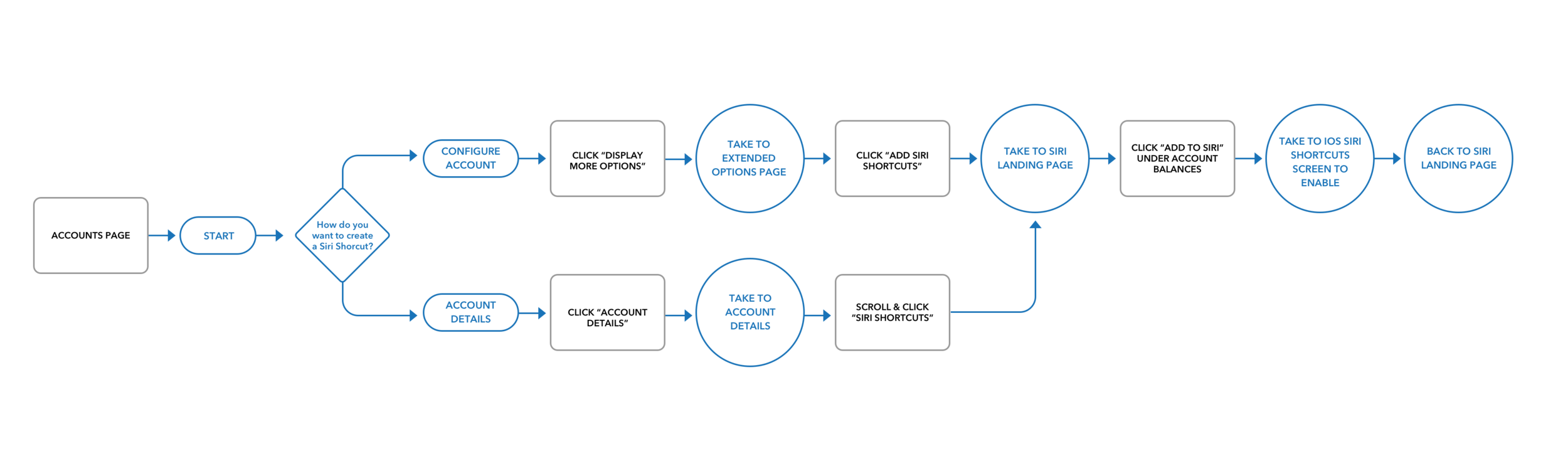
Account Details User Flow
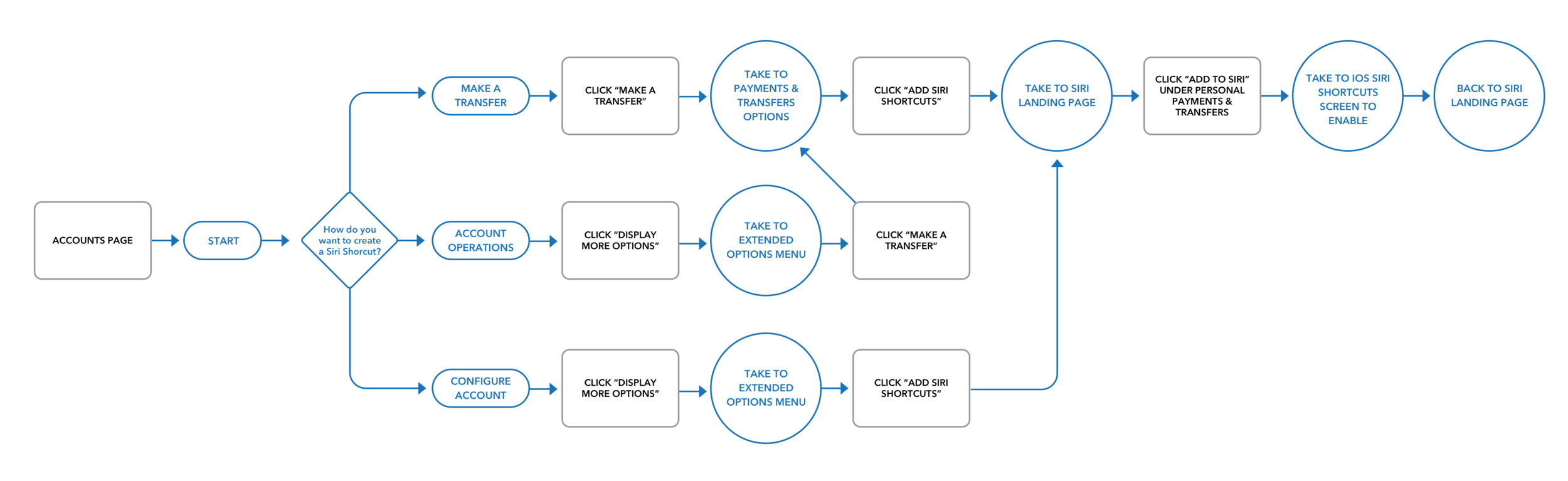
Personal Payments & Transfers User Flow
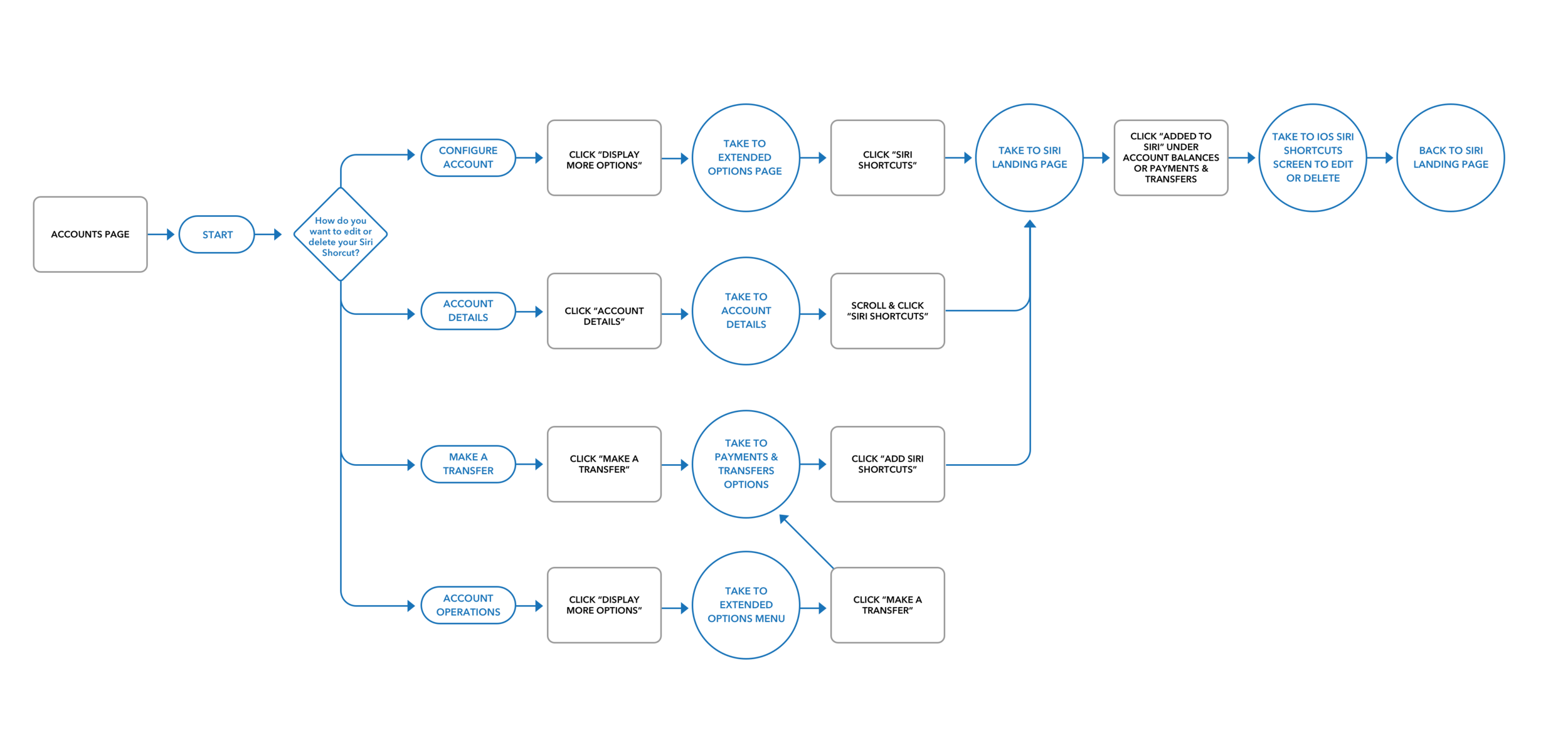
Enable or Delete Siri Shortcut User Flow
Design Decisions
Once I mapped out each possible flow, I began wire-framing basic screens for the flows. I knew that we would be using a lot of existing screens - I would mainly be adding components for Siri Shortcuts to screens and creating a new landing page for Siri Shortcuts. The landing page would end up establishing a design blueprint for new feature screens in other features that came after it.
Additionally, I had to work with a lot of moving parts — meeting Apple’s guidelines, BBVA’s brand standards, pre-defined App Library components and checking-in with our Global design team in Spain, requests from people on my team, etc. There were so many stakeholders that came into play in this projects & I had to juggle all of that while designing a new feature.

Early flow sketches
Recycle
Part of BBVA’s initiatives in 2020 was to track design reuse within our Sketch libraries so we could maintain consistency throughout the app’s experience. Part of this was finding existing components and making them work for the feature.
Once I made an initial design for the landing page, I met with our global design team in Spain to ensure that my design would be approved at the highest level. Not only did I need to create a page that would give the user an overview of what Siri Shortcuts is, I also needed to create a micro illustration to help set the tone of the page. This may seem like a small task, but within the BBVA app, micro illustrations give the user visual cues to let them know what they’re about to read about or agree to.
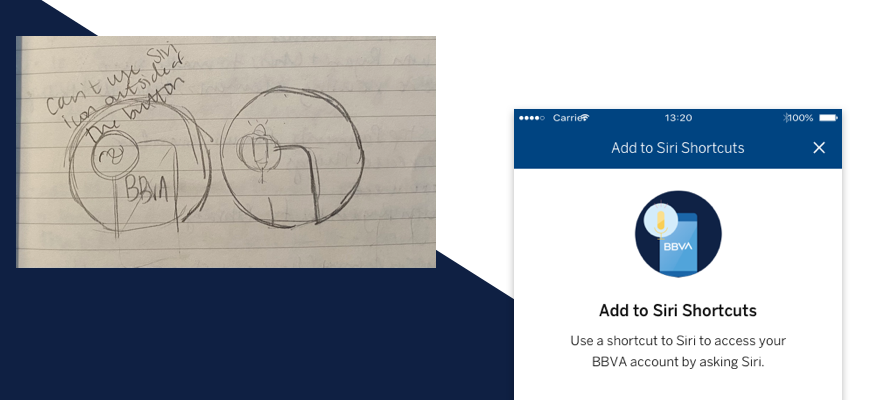
Micro Illustration concepts and the final product
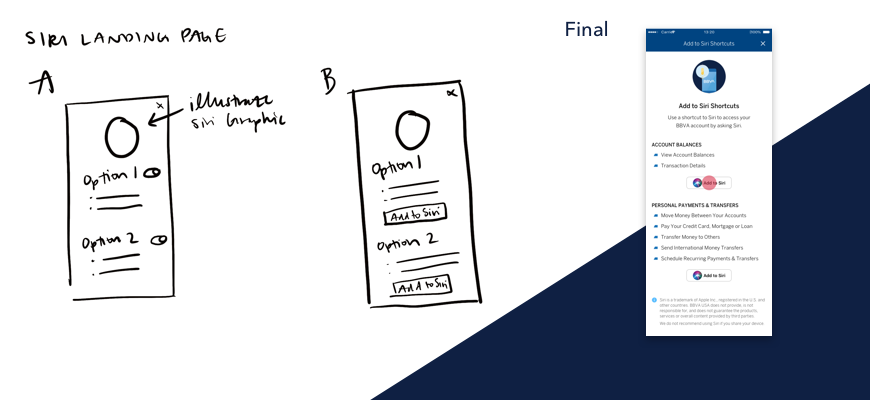
Landing Page Sketches and the final product
Constant Contact
I met with my PO and Lead Developer several times throughout the process to make sure that everyone was on the same page. Once I was finished and everything was approved, I uploaded all of my screen designs to Invision’s Prototyping feature in order to give a clean design-to-development hand-off.

The final design of all of the flows for Siri Shortcuts
In Conclusion
The above design shows only two functions that can be performed through Siri Shortcuts. If I had the go-ahead from Legal & Compliance and the Lead Developer, I would give the user more options there - such as the ability to quickly disable a debit card in the event that it’s stolen or lost.
The Siri Shortcut capabilities are really used to help streamline a process that a user may initiate regularly - whether they use Siri because they find it convenient or because they rely on voice commands to help do certain tasks. Something to consider when adding Shortcuts into your existing app is which functions make the most sense for your product — this is something that we debated for BBVA and I’m sure if I were to do a similar project elsewhere, there would be a lot of discussion about this. You also have to take into consideration how you want the app to suggest Shortcuts - are these predefined actions or do you want to share the user’s information with Apple to help suggest actions for the user (donations)? For BBVA, we needed to use predefined actions for security reasons. The end goal is always to make our user’s day a little bit easier, but where it makes sense.
Overall, I’m still happy with the design that I came up with. It’s clean, within BBVA’s brand guidelines, and gives the user multiple points of entry. This feature will help make a user’s day a little easier, especially if they already rely on Siri to perform small tasks - instead of having to sign-in to their account every time they want to view their account balance or initiate a payment & transfer, they will be able to say “Hey Siri” and begin the process.
As a result of this project, I now have a deeper understanding of Apple’s guidelines and how they can interact with other existing brands. I also walked away with a better idea of how our teams worked at BBVA and was more confident in my communication skills after talking with so many departments about the design.
This was the first of my features that I saw live within the app. It’s rewarding to see something that I spent so much time researching and perfecting go out to users on a national scale.